Right Snippet.
Right Time.
SnipGrab puts the code from your favorite YouTube tutorials right where it belongs: on your screen, exactly when you need it. Focus on learning, not typing.

Stop Pausing Videos. Stay in the Flow.
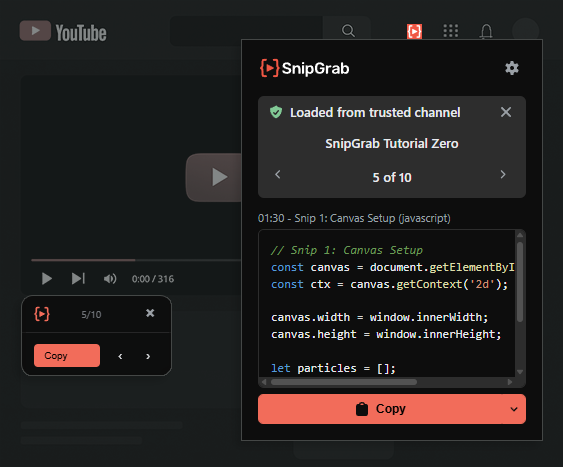
SnipGrab puts the code from your favorite YouTube tutorials right where it belongs: on your screen, exactly when you need it. Focus on learning, not typing.
Stop Pausing Videos. Stay in the Flow.
SnipGrab automatically delivers the right code snippet exactly when it's discussed in a video.
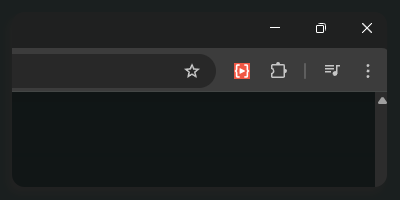
One-click setup from the Chrome Web Store.
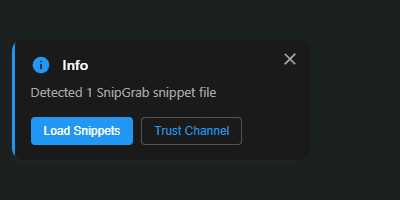
Just press play on a YouTube video that has a snippet link in its description. SnipGrab automatically detects it, whether the file is on GitHub or a creator's personal site.
The right snippet appears on your screen at the right time. To keep you safe, SnipGrab asks for your one-time approval for new websites, ensuring you are always in control.
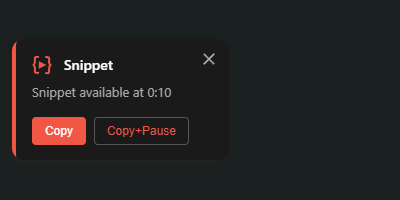

Keep up with fast-paced lessons without ever falling behind on the code.

Quickly grab boilerplate, commands, or reference code from technical deep-dives to use in your own projects.

Grab the exact, complex prompts from AI tutorials to experiment with in ChatGPT, Midjourney, or other platforms.
SnipGrab was built for code, but its power is delivering any text, right on time.

For generative art and large language model (LLM) tutorials.

For DevOps, cloud, and system administration guides.

For product reviews, documentaries, and research deep-dives.

For academic lectures and educational content.
For software, game, or server setup tutorials.

For AWS, Azure, and GCP setup tutorials with complex YAML and JSON configs.

Snippets appear exactly when needed. No more searching or re-watching.
Copy exactly what you need, the second you need it—straight to your clipboard.

Easily share code via timestamped Markdown files on GitHub or your own site.

Activates only on YouTube video pages.
Your trust is our priority. SnipGrab is built to be simple, safe, and transparent.

Our full codebase is on GitHub for anyone to review or audit.

SnipGrab runs 100% locally in your browser. No servers, no accounts.

We don't track you. Period. The SnipGrab extension contains no analytics or tracking scripts from us. Your activity stays on your machine.

Approve new sites and channels once. You can review and manage these permissions at any time.
Stop viewers from getting lost or dropping off. With SnipGrab, you give your audience the exact code or command the moment you show it, keeping them engaged and successful.
It takes less than two minutes.
Use the simple format below. Just a heading with a HH:MM:SS timestamp and a standard code block.
# Your Tutorial Title

## 00:30 – Setting up the server
```javascript
const express = require('express');
const app = express();
app.listen(3000);
```

## 02:45 – Adding middleware
```javascript
app.use(express.json());
app.use(cors());
```Upload the file to GitHub, your own website, or any other public URL.
Add the link to your YouTube video's description. SnipGrab handles the rest automatically.
Ready to boost your channel's engagement?
See the full Creator Docs →

